File Transfer Protocol (FTP)
 File Transfer Protocol (FTP)
File Transfer Protocol, better known as FTP, is a procedure used to upload and download files to and from your web server.
In order to use FTP, you'll need to download and install a software program on your computer. The most widely used FTP program is WS FTP.
When you first launch the FTP program, a startup screen will appear. This screen will enable you to add your web site information and allow the program to connect with your server.
 Start Up Screen
This is a screen shot of the WS FTP startup screen. You simply fill in the information where indicated with your information.
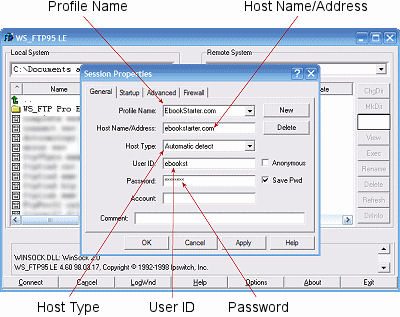
Depending on which FTP client you use, the names may be slightly different.
- Profile Name - This name will be added to the selection list of profile names. Select your profile name according to your domain. For example, if your domain name were smiths.com, your profile name might be Smiths.
- Host Name/Address - Your domain name address.
Example - www.smiths.com - Host Type - The type of server in which your web site is hosted. The standard is Unix.
- User ID - Your hosting User ID. Example - smiths.
- Password - Your hosting password.
 Files
Files
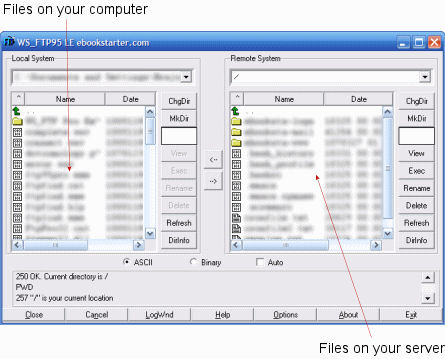
This is a screen shot of the FTP program logged into a server. The files on your computer will be displayed in the left hand window and the files on your server will be displayed in the right hand window.
 Options
Depending on which FTP client you use, the names may be slightly different.
Once the FTP program has connected with your server, you will see the files on your computer in the left window and the files on your server will be displayed in the right window.
 Transferring Files
To maneuver through your folders, simply double click on them. To transfer your files, either double click on the file or highlight it and then click on the transfer files arrow.
To select more than one file at a time, click on each file you'd like to transfer while holding down the Ctrl key on your keyboard. Keep in mind, all of the files you select must be uploaded in the same mode. In other words, you could upload all of your HTML files at the same time, or all of your images.
If all of the files you'd like to upload are all together, you can click on the first file while holding down your Shift key and use the down arrow on your keyboard to highlight all of your files.
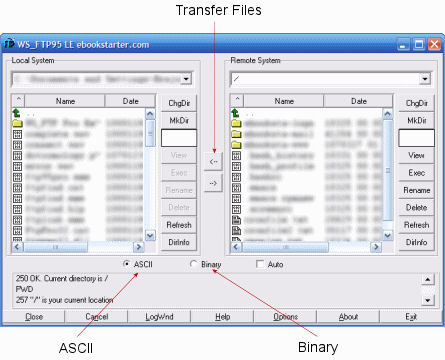
Files, such as text, HTML, and most scripts, should be uploaded to your server in ASCII mode. Any file that isn't ASCII text, such as programs (EXE, ZIP), graphics, ebooks, sounds (WAV, MID) and movies should be uploaded to your server in Binary mode.
File Permissions
When using scripts on your web site, you will be required to set file permissions in order for your scripts to run properly on a Unix server. The most common setting for CGI/Perl scripts is 755. When working with scripts, you may receive an Internal Server Error when you try to run it. Many times, this error is caused by improperly set file permissions.
Permissions:
| Read | 4 | r |
| Write | 2 | w |
| Execute | 1 | x |
| None | 0 | - |
- Read permissions are enabled with the number 4 or the letter r.
- Write permissions are enabled with the number 2 or the letter w.
- Execute permissions are enabled with the number 1 or the letter x.
- No permissions are enabled with the number 0 or a dash (-).
Each of these permissions will be set for each of the following:
- Owner
- Group
- Other
To give you a better idea of how permissions are set, below is an example of a script that requires the permissions to be set to 755 -- it breaks down like this:
7 - Represents the permissions for the Owner (you). The owner has been given Read, Write and Execute permissions. 4+2+1=7. This can also be written like this: rwx
5 - Represents the permissions for the Group (individuals with access to your server). The Group has been given Read and Execute permissions. 4+1=5. This can also be written like this: rx
5 - Represents the permissions for the Others (website visitors). The Others have been given Read and Execute permissions. 4+1=5. This can also be written like this: rx
755 is equal to rwxrxrx
 Changing File Permissions
If you would like to set your file permissions through your FTP program, you can do so like this:
- Log into your server and locate the directory that contains your file.
- Highlight the file that you would like to change permissions.
- Place your mouse pointer over the file and right click to launch a menu.
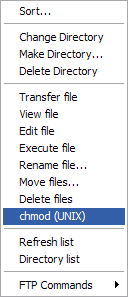
- Click on "chmod (UNIX) to launch the "permissions" window.
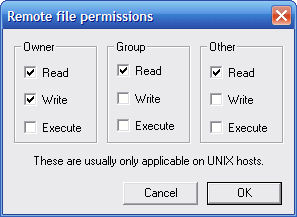
- Set your permissions and click on OK.
In addition to setting permissions with your FTP program, most web hosts will enable you to set permissions through your web page management system.
If you're managing your own web site, having a good FTP program is an absolute must. Not only will it provide you with some independence, but it will also enable you to have complete control over your files.